Overview
The Transaction Errors tool allows partners to monitor and troubleshoot failed transaction attempts across associated merchants. This function provides visibility into error messages, response codes, and failed transaction attributes to assist in resolution and support.
Important: This document is for partners only. Merchants must refer to the Transaction Manager user guide for merchants.
Prerequisites
- You must have access to Transaction Manager with valid login credentials.
- If you do not have login credentials for Transaction Manager, please email the support team
support@chargeanywhere.comto request access.
Login URL
- Test URL:
https://sandbox.chargeanywhere.com/TransactionManager/Login.aspx - Production URL:
https://www.chargeanywhere.com/transactionmanager/login.aspx
Accessing Transaction Errors
- Log in to Transaction Manager with your partner credentials.
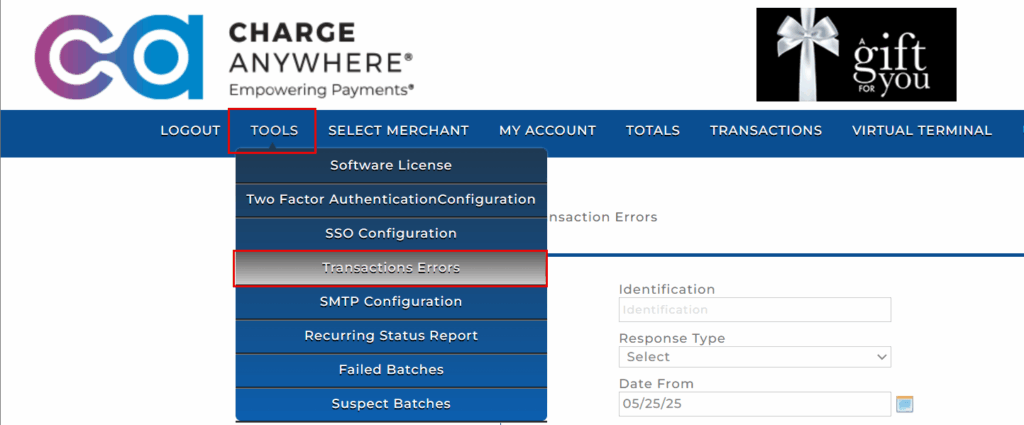
- From the top navigation bar, click the Tools tab.
- In the drop-down menu, select Transaction Errors.
Apply Filters
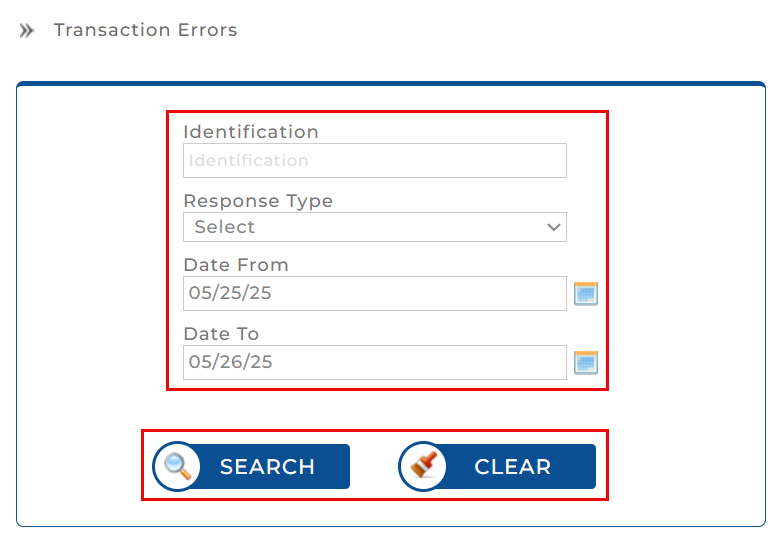
At the top of the Transaction Errors screen, you can apply filters to narrow down your search:
| Filter Field | Description |
|---|---|
| Identification | Enter the unique terminal ID or device identifier for the transaction. |
| Response Type | Choose one of the following from the dropdown: Got Response Response W/Error No Response Duplicate |
| Date From / Date To | Specify the date range for which you want to view the errors. Use the calendar picker to select dates easily. |
- Click Search to execute the search with the selected filter criteria.
- Click Clear to reset all filters to their default state.
Viewing Results
Once the filters are applied and search is executed, the system displays a table of matching transaction errors with the following fields:
| Field | Description |
|---|---|
| Company Name | The name of the merchant’s company. |
| Identification | Terminal or device ID used during the transaction. |
| Inbound | Timestamp of the inbound transaction request. |
| Errors | Description of the error (e.g., Merchant Service Not Active / Processor Not Set). |
| Response Code | Error code returned from the gateway or processor (e.g., 00B). |
| Response Text | Human-readable response message (e.g., SERVICE NOT ALLOWED). |

Additional Features
- Items per Page: Customize the number of error rows shown per page.
- Pagination: Use the arrows to navigate through multiple pages of error logs.
Use Case Scenarios
- Investigate errors for a specific terminal or time window.
- Identify patterns in failed transactions to escalate to Charge Anywhere support.
- Assist merchants in understanding processor rejections or misconfigurations.
Subscribe to Documentation Updates
Get a monthly summary of technical document updates.